Mobile App Redesign

UX Toast Redesign

Transforming UX education through mobile learning - A comprehensive redesign of a UX learning application

Mobile App Education Redesign UX Research
Project Details

My Role

UX/UI Designer, Researcher (Academic)

Platform

Mobile (iOS)

Tools

Figma, Teams (Test Design/Interview/A-B testing) and Microsoft Forms (System Usability Scale/ Product reaction card/ Consent Paper)

Introduction

In response to the evolving demands in the digital landscape, the redesign for the User Experience design learning application (UX Toast) demonstrates how to advance UX mobile learning. This case study introduces the redesign process of UX Toast, explores the mobile learning domain through literature, identifies issues, and provides a critical reflection of the design process and outcomes.

The redesigned application aims to meet the needs of aspiring UX professionals, students, and enthusiasts seeking a deeper understanding of UX principles.

Background on UX/UI Education

The landscape of UX/UI education has seen significant growth, with notable courses from platforms like Coursera attracting hundreds of thousands of students. This burgeoning interest underscores the need for a reliable mobile application that aggregates quality UX learning resources.

900K+

Students enrolled in Google's UX Design course (since March 2021)

85K+

Students enrolled in Meta's UX/UI Design course

The Challenge

The original UX Toast application faced several critical usability and design issues that hindered the learning experience:

Usability Issues:

  • Confusing navigation and icons
  • Cluttered information architecture
  • Unclear navigation with dead ends

Content Issues:

  • Text-heavy with minimal visual aids
  • No access to resources or references
  • Trust and credibility concerns

Methodology

A comprehensive research and design approach was employed to ensure the redesign met user needs and industry standards:

Expert Review Evaluation
Information Architecture Analysis
Competitor Analysis
Literature Review
Usability Testing
Screen Recording
Post-Test Interviews
SUS Method
Product Reaction Cards
A/B Testing
Affinity Diagramming
Persona Development

Information Architecture & Original Design

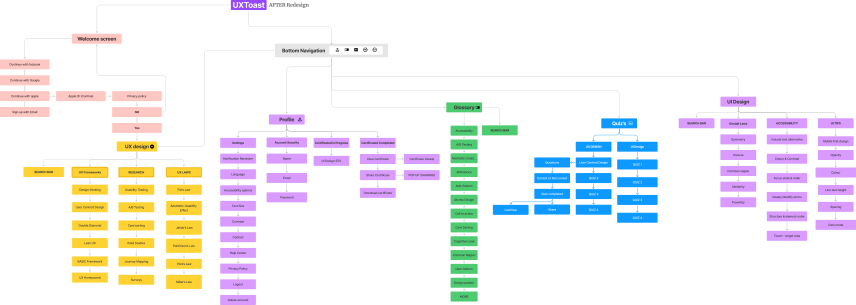
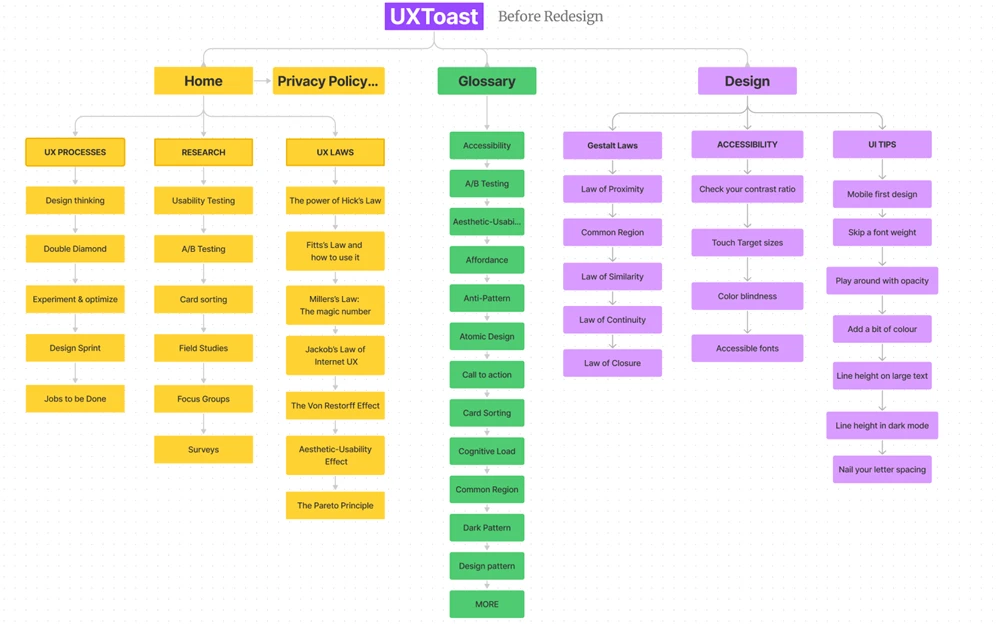
The original design featured a cluttered information architecture with a confusing navigation system. The redesign aimed to simplify the architecture, enhance visual design, and provide clearer navigation paths.

Before: Original Structure

Original Information Architecture showing cluttered and confusing structure

Cluttered and confusing structure (click to enlarge)

After: Redesigned Structure

πŸ“± Tap image to view fullscreen

Redesigned Information Architecture - Tap to view fullscreen

Tap to view fullscreen

Plot twist: It looks MORE complex πŸ˜… Why? The original hid problemsβ€”dead ends, missing labels, lost users, no references (credibility issues), text-heavy content, and unclear navigation. The redesign adds clear paths, citations, visual aids, and proper structure.

Research & Discovery

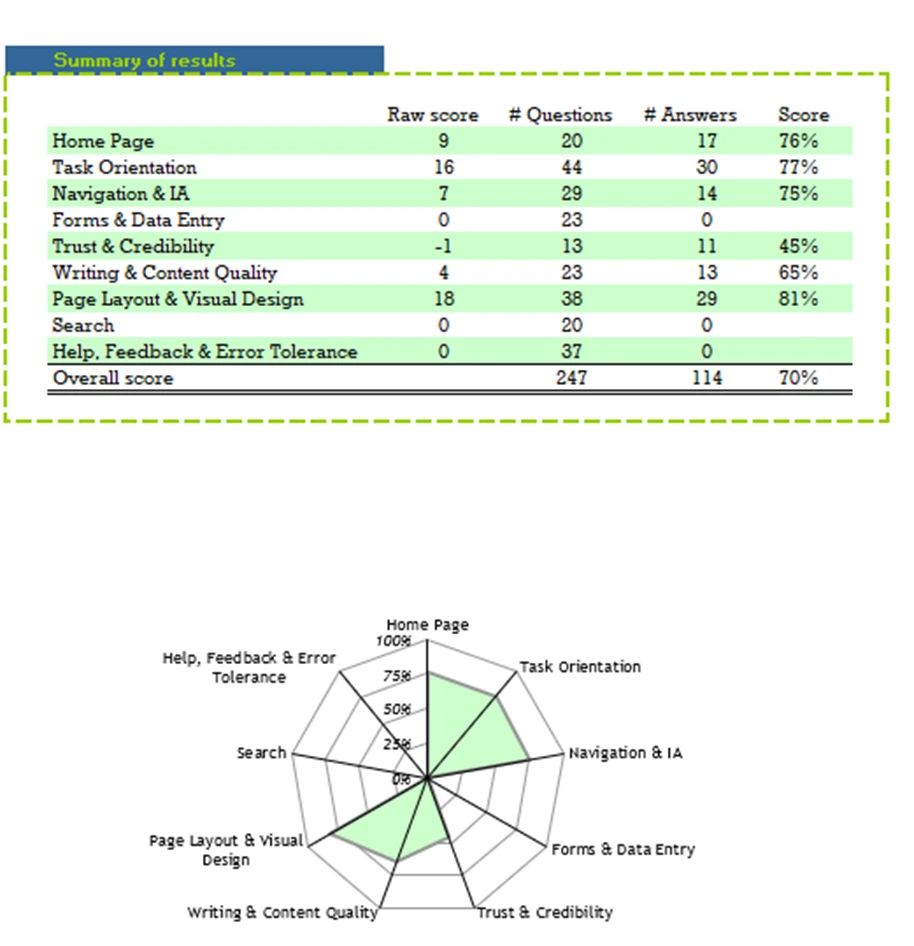
Expert Review Findings

An expert review was conducted on the initial design of UX Toast, revealing critical issues that needed to be addressed:

Expert Review Analysis showing key findings and recommendations

Navigation Issues

  • β€’ Confusing icons on bottom bar
  • β€’ Unclear navigation paths
  • β€’ Potential dead ends

Content Problems

  • β€’ Text-heavy with minimal visuals
  • β€’ No access to references
  • β€’ Overwhelming text blocks

Trust & Credibility

  • β€’ Lack of citations
  • β€’ No testimonials
  • β€’ Unclear data collection

Competitive Analysis

Nielsen Norman Group

Industry-standard UX resources and certifications

Advantages:
  • β€’ Valid industry-standard information
  • β€’ Certifications and training options
  • β€’ High-quality articles and videos
Disadvantages:
  • β€’ Not accessible offline
  • β€’ Requires navigation to find content

Coursera

Wide range of UX courses and degrees

Advantages:
  • β€’ University degrees and certificates
  • β€’ Free audit options available
  • β€’ Comprehensive course content
Disadvantages:
  • β€’ Overwhelming number of choices
  • β€’ Time-consuming courses (10+ hours)

UX Tools

Practical UX challenges and tutorials

Advantages:
  • β€’ Practical UX challenges
  • β€’ Industry survey data and insights
  • β€’ Links to tutorials and tools
Disadvantages:
  • β€’ Some outdated articles
  • β€’ Limited challenges list

Udemy

Affordable UX/UI courses at all levels

Advantages:
  • β€’ Frequent discounts
  • β€’ Detailed reviews and content
  • β€’ Practical tool tutorials
Disadvantages:
  • β€’ Requires payment
  • β€’ Lengthy courses (16+ hours)

UX Hints

Task-based learning with downloadable resources

Advantages:
  • β€’ Intuitive card-based design
  • β€’ Downloadable PDF checklists
  • β€’ Links to original articles
Disadvantages:
  • β€’ Lacks categorization on main page
  • β€’ Requires scrolling for navigation

Research Insights from Literature

1. Mobile Learning and UX Design

Context:

The rapid evolution of technology has necessitated the integration of mobile learning (m-Learning) into educational practices. Mobile learning allows students to access educational content anytime and anywhere, providing the flexibility to study at their own pace.

Application:
  • β€’ Seamless learning experience regardless of location or time
  • β€’ Flexibility and convenience for high-mobility learners
  • β€’ Accommodates diverse learning schedules

2. Accessibility in Mobile Learning

Context:

Accessibility in mobile learning is crucial for ensuring that all students, including those with disabilities, have equal access to educational resources. Incorporating accessibility and universal design principles is essential for compliance with federal laws.

Application:
  • β€’ Adjustable text sizes for readability
  • β€’ Screen reader compatibility
  • β€’ Voice command functionality
  • β€’ Universal design principles integration

3. Gamification in E-Learning

Context:

Gamification in e-learning can significantly enhance student engagement and motivation. Integrating game elements into online learning environments helps achieve educational objectives and fosters a more interactive and enjoyable learning experience.

Application:
  • β€’ Badges for achievement recognition
  • β€’ Leaderboards for friendly competition
  • β€’ Interactive quizzes for engagement
  • β€’ Progress tracking and rewards

4. Usability Guidelines for Learning Mobile Applications

Context:

Usability is a critical factor in the success of mobile learning applications. Mobile devices' limitations, such as small screens and limited input capabilities, pose unique challenges that must be addressed through effective usability evaluation methods.

Application:
  • β€’ Rigorous heuristic evaluation
  • β€’ Guideline reviews for consistency
  • β€’ Domain-specific usability standards
  • β€’ User-friendly interface design

5. Mobile Apps in Daily Learning Activities

Context:

Mobile apps have transformed daily learning by offering interactive materials, simulations, and educational games. They cater to students accustomed to digital sources for information and entertainment, though challenges such as design limitations and technical hurdles need to be addressed.

Application:
  • β€’ Interactive lessons and tutorials
  • β€’ Educational simulations
  • β€’ Engaging game-based learning
  • β€’ Robust design solutions

Initial Usability Testing (Version 1)

Usability testing was conducted with three participants who provided valuable feedback on the initial design. The System Usability Scale (SUS) and Product Reaction Cards were used to gather quantitative and qualitative data.

Participant 1

75

SUS Score - Grade B (Good)

Key Feedback:
  • β€’ Suggested starting with images before text
  • β€’ Appreciated calming and secure colors
  • β€’ Found UI design easy to understand
  • β€’ Expressed doubts about privacy policy
Common Reaction Words:
Approachable Effective Clean Useful Secure

Participant 2

95

SUS Score - Grade A (Excellent)

Key Feedback:
  • β€’ Described app as user-friendly
  • β€’ Suggested changing similar images in design section
  • β€’ Recommended more visual appeal for UX Laws page
Common Reaction Words:
Clean Comfortable Helpful Satisfying Stable

Participant 3

82.5

SUS Score - Grade A (Excellent)

Key Feedback:
  • β€’ Found app informative and stress-reducing
  • β€’ Noted numbering mistake in UX Process
  • β€’ Liked time-spent-on-tasks feature
  • β€’ Suggested adding support and quick search
Common Reaction Words:
Accessible Engaging Professional Valuable Novel
Strengths Identified
  • β€’ Clean and responsive design
  • β€’ Simplistic and straightforward interface
  • β€’ Secure and trustworthy feel
  • β€’ Easy to understand navigation
Suggestions for Improvement
  • β€’ Improve image relevance and appeal
  • β€’ Add support and documentation
  • β€’ Implement quick search feature
  • β€’ Enhance visual appeal of content pages

Lo-Fi A/B Testing (Version 2)

In this iteration, the usability testing process was revised to incorporate both online and face-to-face sessions. Participants were given specific tasks to perform and provided feedback on low-fidelity UI screens.

Participant 1 (Online Session)

Key Feedback:
  • β€’ Suggested more comprehensive information
  • β€’ Emphasized importance of clear visuals and icons
  • β€’ Recommended easier privacy policy access
  • β€’ Requested examples and references
Insights:

Information architecture improvements needed with better navigation and credibility through references

Participant 2 (Online Session)

Key Feedback:
  • β€’ Expressed preferences for certain design elements
  • β€’ Stressed need for diagrams and videos
  • β€’ Suggested including references for trust
  • β€’ Recommended improved navigation options
Insights:

Visual representations and multimedia content crucial for comprehension and engagement

Participant 3 (Face-to-Face Session)

Key Feedback:
  • β€’ Highlighted need for clarity in content
  • β€’ Recommended improved design aesthetics
  • β€’ Suggested better categorization of information
  • β€’ Emphasized relevant navigation icons
Insights:

Consistent use of visuals and clear categorization essential for user experience

Key Takeaways from A/B Testing
Design Principles
  • β€’ Maintain simplicity
  • β€’ Ensure clarity
  • β€’ Use consistent elements
Visual Aids
  • β€’ Incorporate diagrams
  • β€’ Add videos
  • β€’ Use clear icons
Credibility
  • β€’ Include references
  • β€’ Provide examples
  • β€’ Build trust

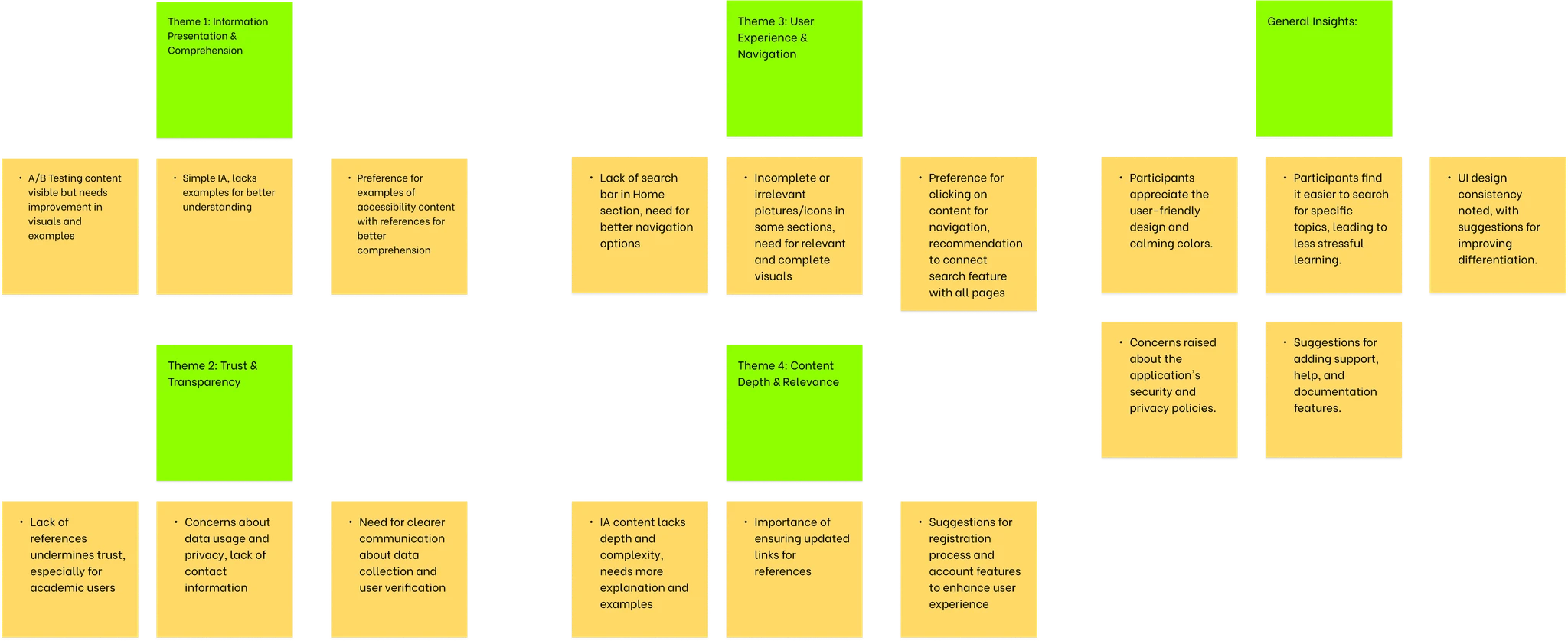
Affinity Diagramming

Insights from user testing were organized through affinity diagramming to identify patterns and prioritize design decisions.

Affinity Diagram showing organized insights and patterns from user feedback

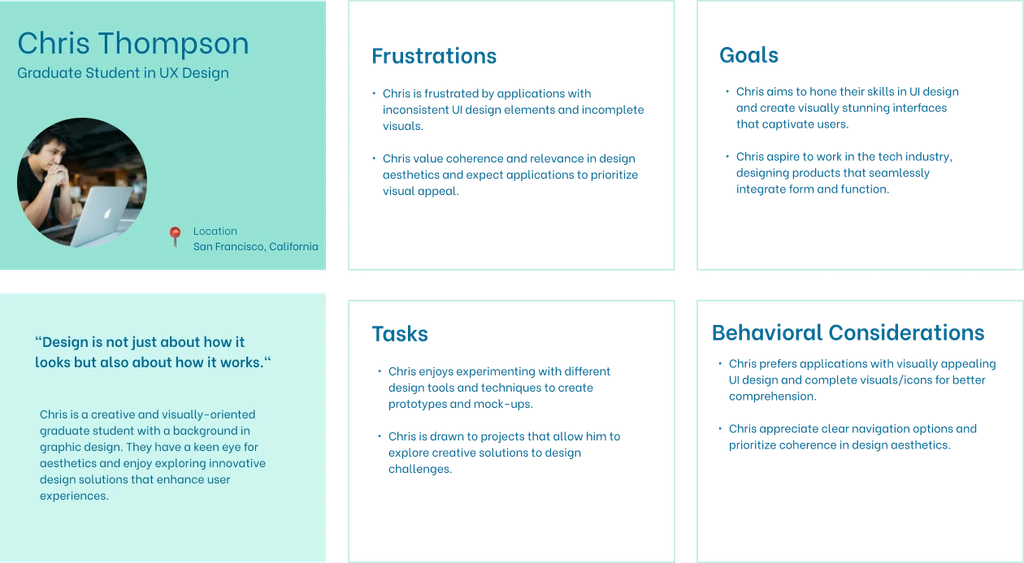
User Personas

Primary user persona showing demographics, goals, and pain points
Secondary user persona showing demographics, goals, and pain points

User personas were developed based on research insights to guide design decisions and ensure the app meets diverse user needs.

Design Process & Solutions

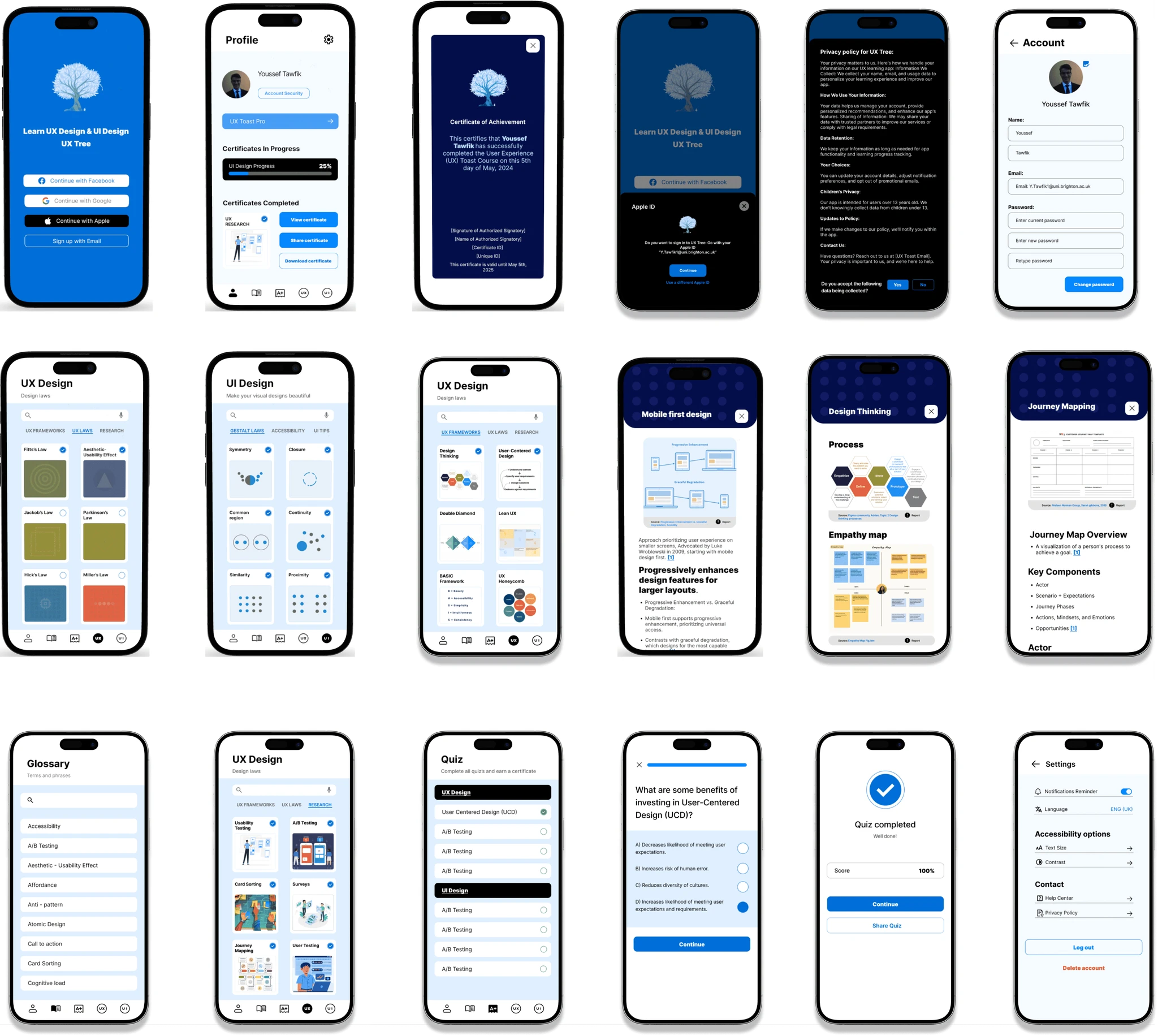
High-Fidelity Prototype

High-fidelity prototype screens showing final visual design and interactions

High-fidelity prototype screens (click to enlarge)

Interactive Prototype

The high-fidelity prototype incorporates all feedback from usability testing, featuring improved navigation, enhanced visual design, and comprehensive content organization.

View Interactive Prototype β†’

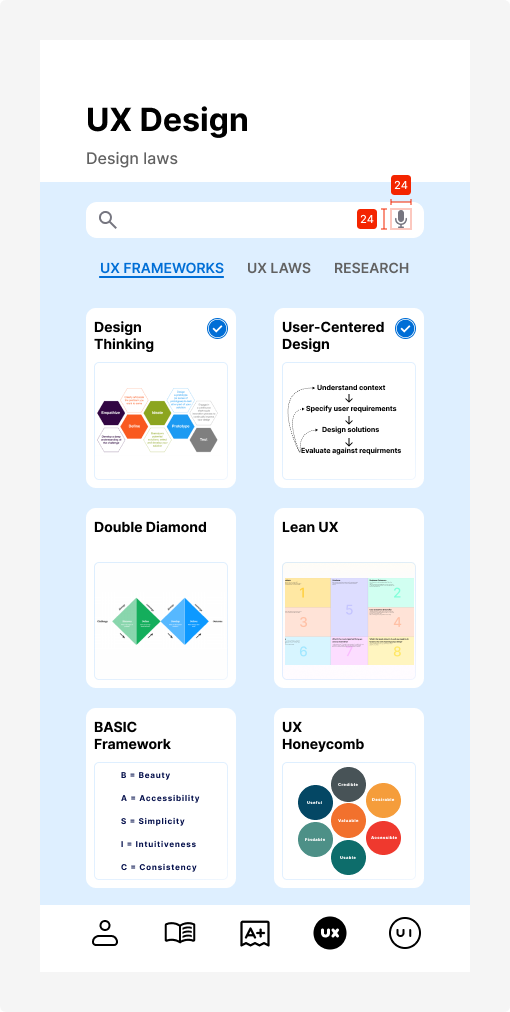
Design Measures & Metrics

UX Toast app screen showing design interface

High-fidelity app screens showcasing design implementation (click to enlarge)

8px

Base Unit

Grid system spacing

16/24

Body Text

Size/Line height (px)

4.5:1

Contrast Ratio

WCAG AA compliant

44px

Touch Target

Minimum tap area

πŸ“

Screen Layouts

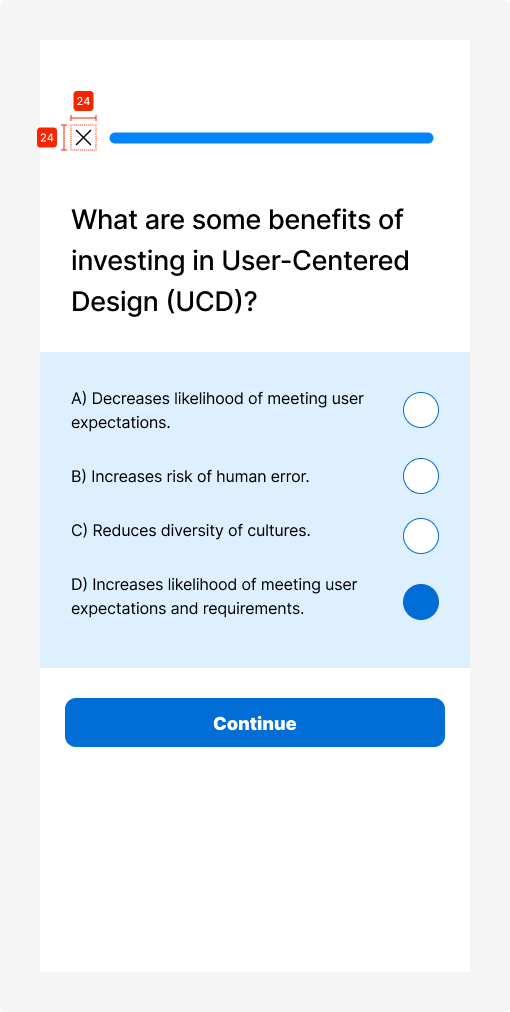
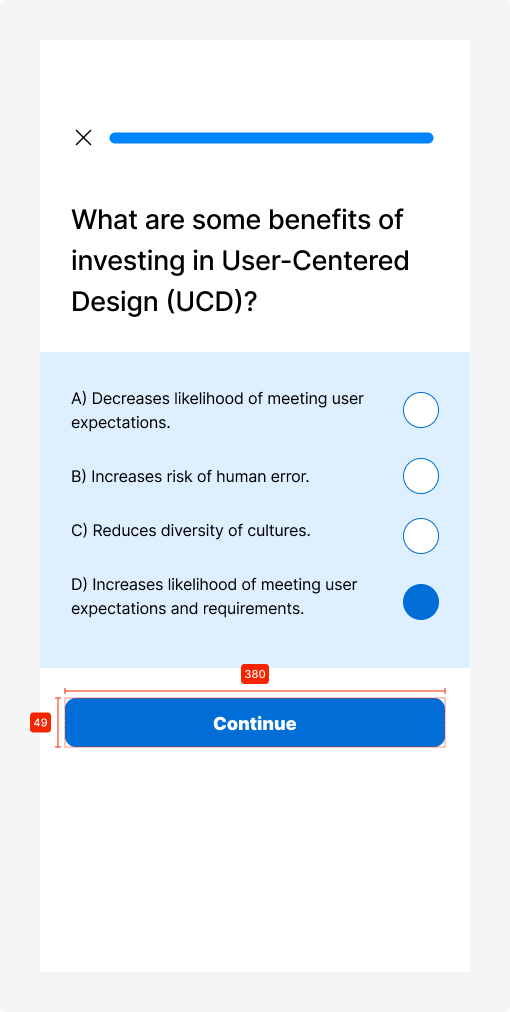
Quiz Screens
  • β€’ Multiple choice with radio buttons
  • β€’ Visual indicators for selections
  • β€’ Progress tracking with dots
  • β€’ Continue button at bottom
Content Screens
  • β€’ Lesson cards with icons
  • β€’ Visual diagrams and illustrations
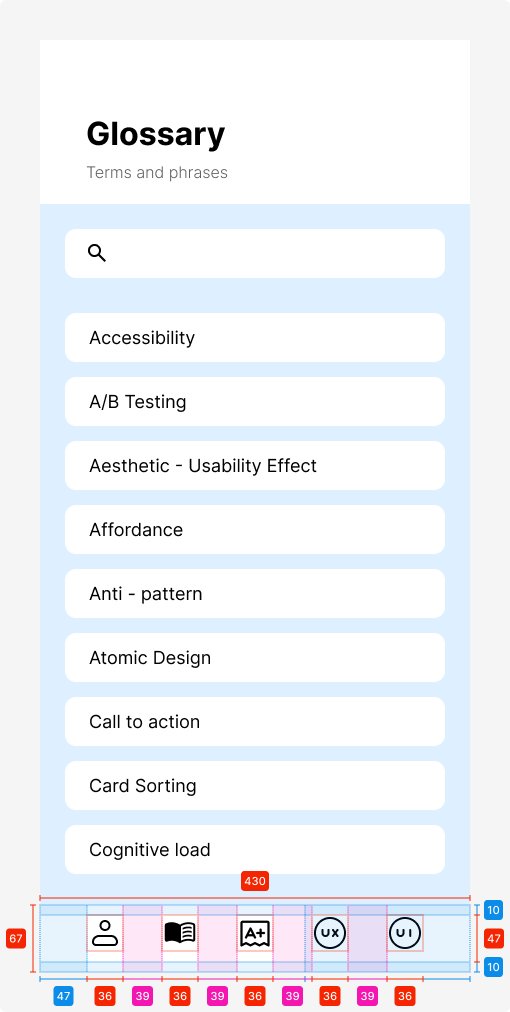
  • β€’ Bottom navigation bar (67px height)
πŸ”

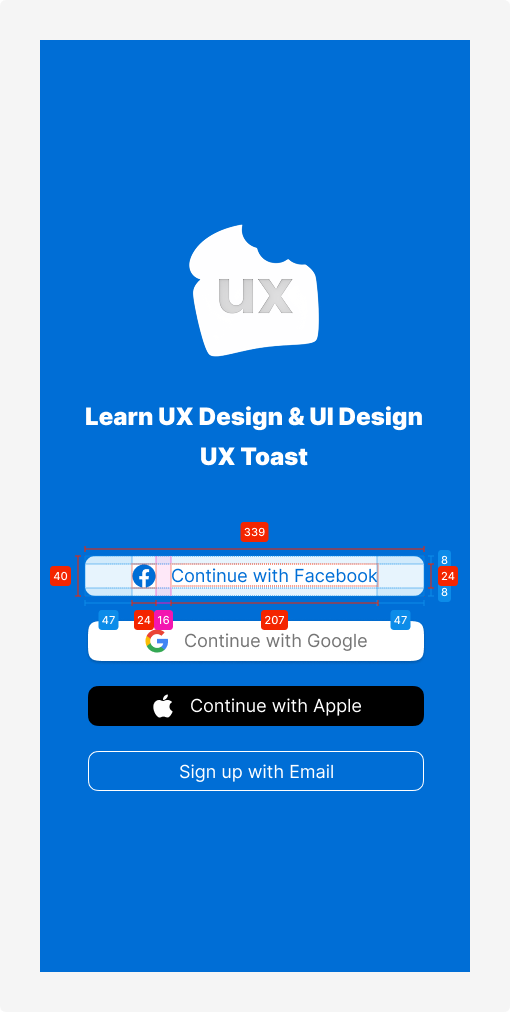
Authentication Screens

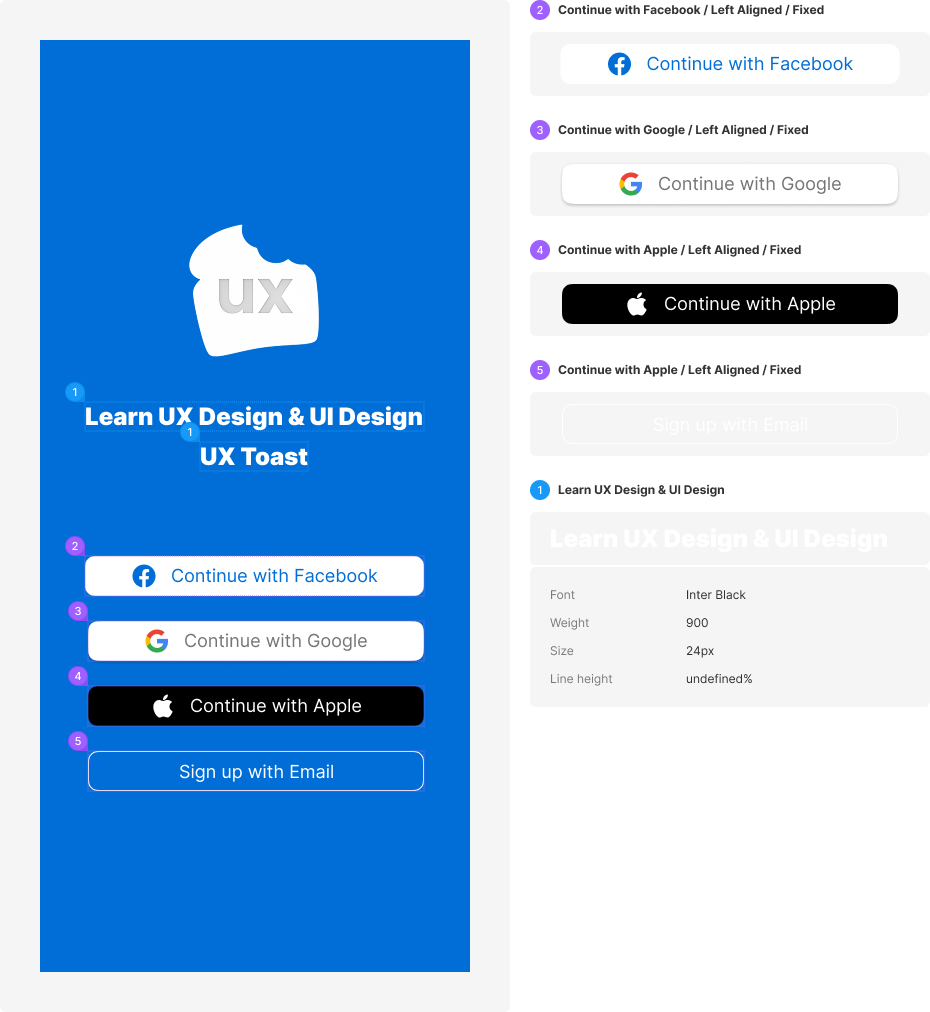
Social Login Buttons
  • β€’ Facebook (Blue #1877F2)
  • β€’ Google (White with border)
  • β€’ Apple (Black #000000)
  • β€’ Button height: 40px
  • β€’ Border radius: 8px
πŸ“š

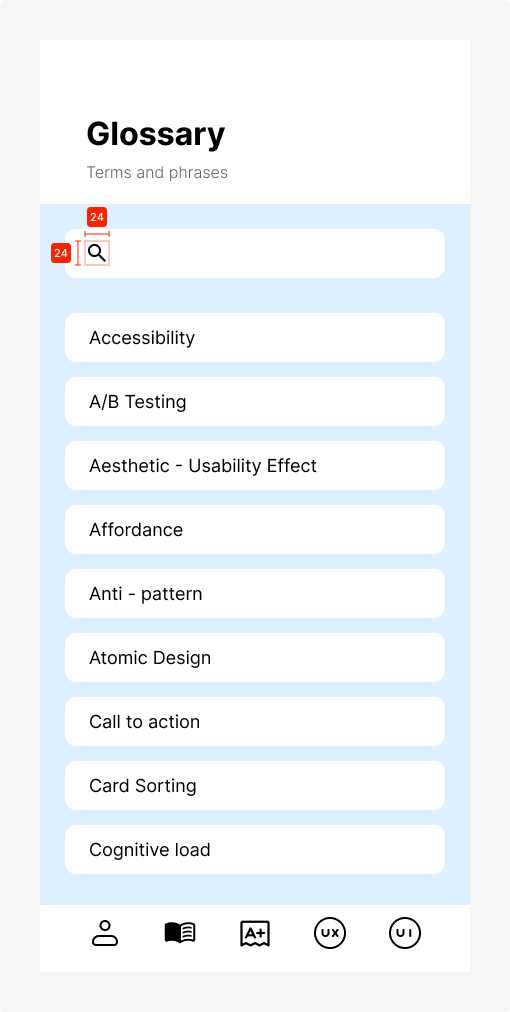
Glossary & Lists

Search bar height 49px
List item height 49px
Section headers 39px
Side padding 25px
🧭

Navigation Bar

Bar height 67px
Icon size 24Γ—24px
Active indicator Solid Black
Icon spacing Equal distribution

Design System

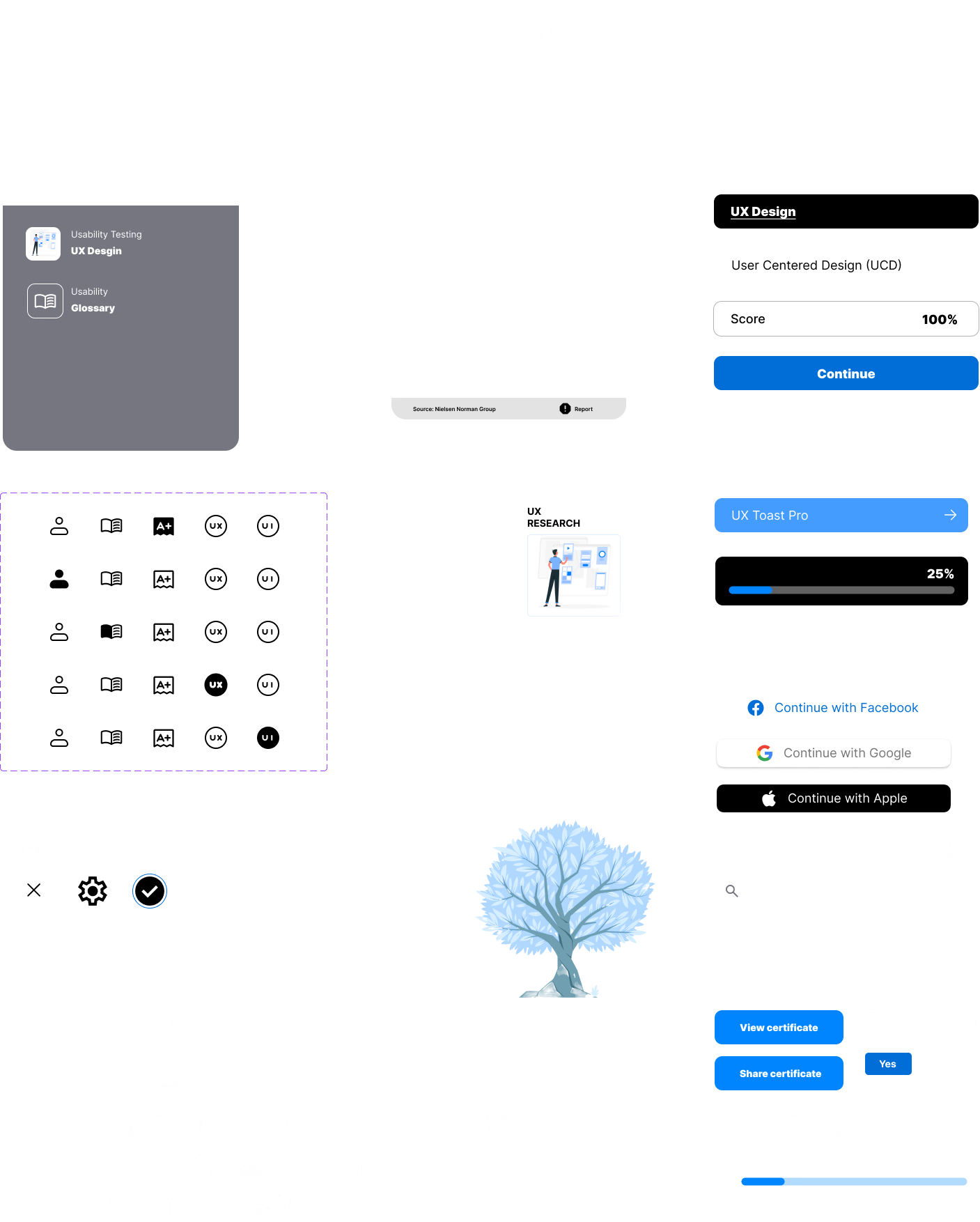
Complete design system showing all components, colors, typography, and UI elements

Complete design system overview (click to enlarge)

πŸ“±

Screen Components

  • 32 Profile Headers
  • 27 Quiz Question Templates
  • 24 Topic Title Screens
  • 18 Form Screens (Sign Up/Continue)
  • 16 UX/UI Card Layouts
🧭

Navigation & Icons

  • β€’ Bottom navigation bar with 5 icons
  • β€’ Profile, Library, Quiz, Settings icons
  • β€’ Utility icons (search, mic, close)
  • β€’ Action icons (checkmark, arrows)
  • β€’ Notification and language icons
🎨

Color Palette

Primary Blue

Buttons & CTAs

Dark Gray

Text & backgrounds

White

Cards & surfaces

🧩

UI Components

  • β€’ Primary & secondary buttons
  • β€’ Social login buttons (Facebook, Google, Apple)
  • β€’ Progress bars and sliders
  • β€’ Score cards with percentages
  • β€’ Certificate displays
Aa

Typography

Heading Bold

Headers & titles

Body Regular

Content & descriptions

Caption Medium

Labels & metadata

✨

Special Elements

  • β€’ Brand illustration (winter tree)
  • β€’ Quiz question cards
  • β€’ Certificate templates
  • β€’ Achievement badges
  • β€’ Profile avatars

Design Principles

🎯
Consistency

Unified visual language across all screens and interactions

β™Ώ
Accessibility

WCAG compliant with proper contrast ratios and touch targets

πŸ“
Scalability

Modular components designed for future growth

Design Iterations

Based on user feedback from multiple testing rounds, significant improvements were made to the interface design, navigation, and content presentation.

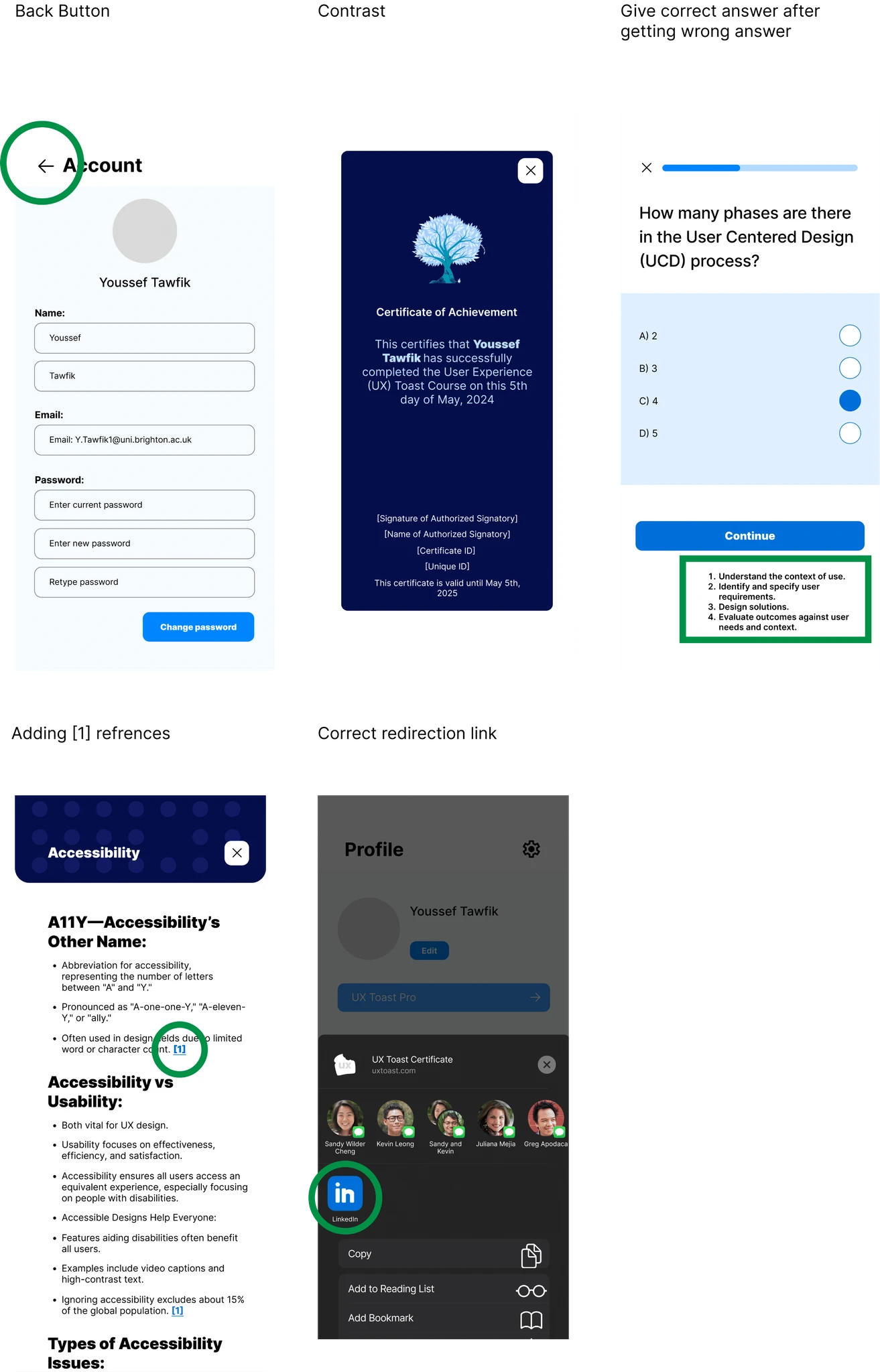
Design iterations showing before and after comparisons of key improvements
🧭

Navigation Improvements

Clearer icons with text labels and intuitive information architecture

πŸ“š

Content Enhancement

Visual aids, references, and better content organization

β™Ώ

Accessibility Features

Improved contrast, text sizing, and screen reader support

High-Fidelity Testing & Results

Testing Overview

The high-fidelity prototype testing involved participants performing specific tasks and providing feedback on various aspects of the design. Tasks included navigating the welcome page, exploring sections like Glossary and Profile, engaging with UX and UI design elements, playing a quiz game, and checking accessibility options.

2

Participants tested

92.5

Average SUS score

8

Tasks completed

A

Overall grade

SUS Score Progression Across Iterations

84.2

Lo-Fi V1 avg SUS

β†’
92.5

Hi-Fi avg SUS

=
+8.3 pts

across 3 rounds of iteration

Participant Feedback

Participant 1

Comprehensive testing across all features

95

SUS Score

Grade A - Excellent

Tasks & Observations
  • β€’ Navigated welcome page successfully
  • β€’ Explored Glossary and Profile sections
  • β€’ Engaged with UX/UI design elements
  • β€’ Completed quiz game
  • β€’ Checked accessibility options
Product Reaction Cards
Accessible Engaging Organized Appealing Attractive Clean Clear Confident Easy to use Effective Efficient Useful
Detailed Feedback
Spacing, Color Contrast, Clarity
  • β€’ Suggested adding text to icons for clarification
  • β€’ Recommended improving color contrast for better readability
  • β€’ Noted need to fix small references above text
Layout and Navigation
  • β€’ Suggested including app logo at top of screen
  • β€’ Highlighted confusion when locating Glossary
  • β€’ Positive comments on Profile settings page
Feature Improvements
  • β€’ Added close button and back button to profile section
  • β€’ Recommended improvements to Fitt's Law screen

Participant 2

Focused testing on interface elements

90

SUS Score

Grade A - Excellent

Tasks & Observations
  • β€’ Engaged in high-fidelity testing
  • β€’ Focused on interface elements
  • β€’ Tested various features
  • β€’ Provided detailed feedback
Product Reaction Cards
Accessible Engaging Clear Helpful Organized Creative Meaningful Easy to use Useful Usable
Detailed Feedback
Icon and Contrast Improvements
  • β€’ Suggested increasing contrast for icons
  • β€’ Recommended making icons bigger for phone screens
  • β€’ Advised on color differences for icon differentiation
Content and Navigation
  • β€’ Recommended removing references from headers
  • β€’ Suggested adding numbered references at bottom
  • β€’ Proposed scoring system for quiz questions
Feature Improvements
  • β€’ Suggested fixes for share certificate screen
  • β€’ Recommended profile edit function improvements
  • β€’ Proposed providing correct answers in quiz

Testing Sessions

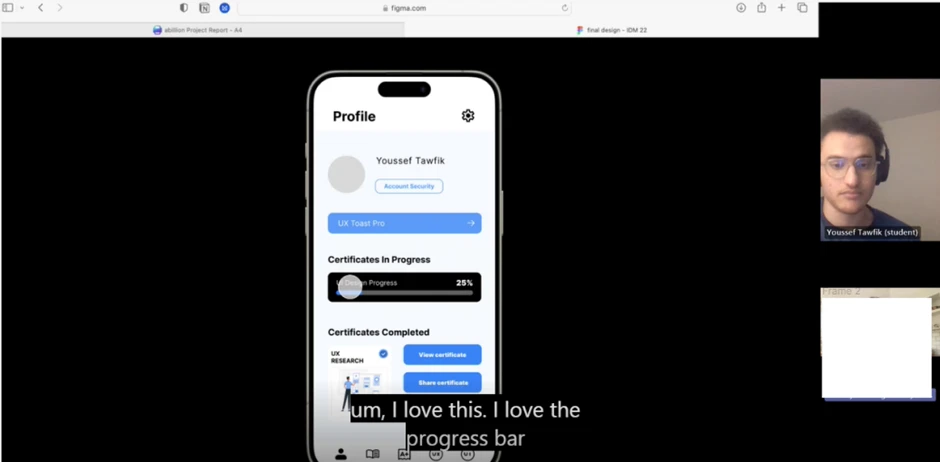
Testing Session 1 showing participant interaction and feedback

Screen recordings captured user interactions and decision-making processes (click to enlarge)

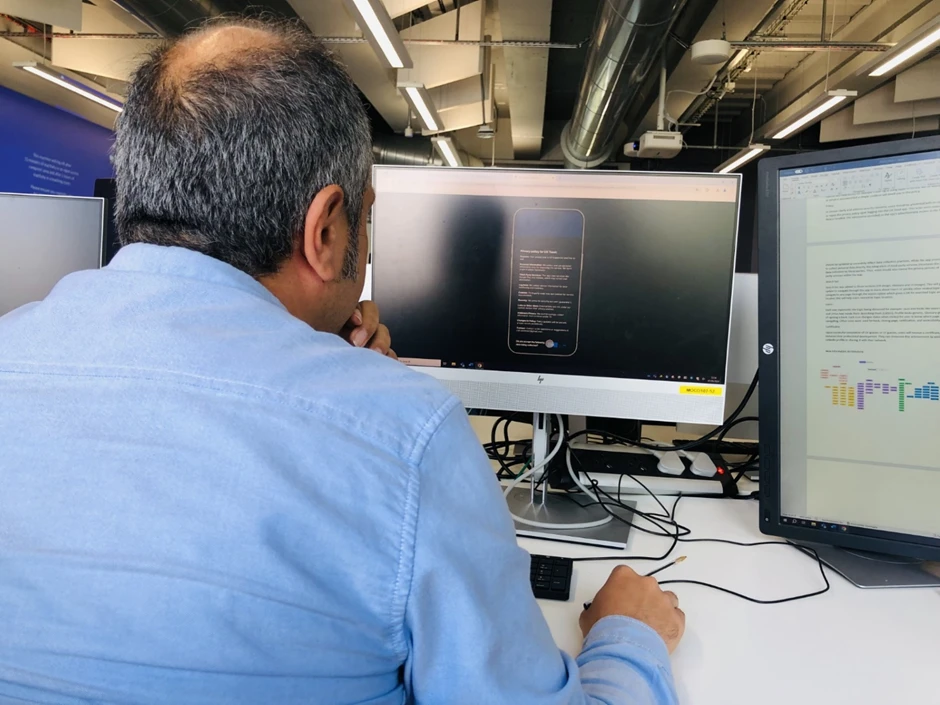
Testing Session 2 showing post-test interviews and insights

Detailed interviews provided qualitative insights into user experience (click to enlarge)

Key Insights from Testing

Strengths Validated

  • βœ“
    Usability: Both participants found the system engaging, organized, and easy to use
  • βœ“
    Design: Positive reactions to overall interface with high marks for clarity and attractiveness
  • βœ“
    Profile Settings: Particularly well-received feature by participants

Areas for Improvement

  • !
    Icon and Text Clarity: Add text labels to icons and improve color contrast
  • !
    Quiz Functionality: Provide immediate feedback on answers to enhance learning
  • !
    Layout Adjustments: Fix spacing, references, and consider different device sizes
  • !
    Brand Recognition: Include app logo at top for better identification

Final Outcomes & Impact

πŸ“ˆ
92.5

Average SUS Score

Hi-Fi final testing

✨
100%

Task Completion

All participants successful

🎯
A

Overall Grade

Industry-leading performance

πŸ”„
3

Rounds of Testing

Lo-Fi β†’ A/B β†’ Hi-Fi

SUS journey: 84.2 β†’ 92.5 +8.3 pts across iterations

Project Impact

The UX Toast redesign successfully transformed a confusing, text-heavy learning app into an engaging, accessible, and user-friendly educational platform. The comprehensive research and iterative design process resulted in:

  • β€’ Significantly improved usability and user satisfaction
  • β€’ Enhanced accessibility for diverse learners
  • β€’ Clear navigation and intuitive information architecture
  • β€’ Engaging gamification elements for motivation
  • β€’ Trust and credibility through proper citations
  • β€’ Mobile-first design for learning on-the-go